


Guitar in hand. No tuner in sight. Rehearsal starts in five minutes and every string sounds like it's arguing with the other five. You know the feeling. And the fix was in your pocket the whole time, because a decent tuning app pulls you out of that mess before anyone even notices you were out of tune.
That's really the whole appeal, when you boil it down. One device, the phone you're already carrying, ends up holding your tuner, your metronome, and half the time your sheet music too. Prop it on a small stand and, congratulations, you've built a fretboard hub out of something that was already in your pocket. Hands-free tuning. Instant chord charts. One less bag by the door. Not bad for a tool most people never think of as musical gear at all.
Understanding How Guitar Tuner Apps Work
Your phone's mic does the actual listening. It picks up the sound wave coming off the string, works out its frequency in Hertz, and stacks that against a reference pitch (440Hz for the note A, in most cases). From there, you get a needle, a wheel, or sometimes just a strip of color, and it settles once you're sharp, flat, or sitting right where you need to be.
What makes this useful rather than fiddly is chromatic tracking. The app doesn't wait for one specific string in one specific order; it just tells you what note you're playing, whatever that happens to be. So you can jump from standard tuning to drop D to some open tuning you barely remember the name of, and the app keeps up without you touching a menu.
Free vs. Paid Guitar Tuner Apps: What You Actually Get
Nobody says this part out loud, but a free tuner and a paid one are usually just as accurate as each other. The real gap is depth, not precision. Paid versions stack extra tunings and extra instruments on top of a tuning engine that, underneath it all, isn't doing anything wildly different from the free one.
Free Guitar Tuner Apps
A free app gives beginners exactly what day one needs. Nothing more, nothing you'll miss. Standard tuning, a clean chromatic display, accuracy within a cent or two, which is plenty for a bedroom, a classroom, or a first band practice in somebody's garage.
The trade-off shows up around the edges, and you'll notice it fast. Alternate tunings and extra instruments often sit behind a paywall. Some apps make you sit through an ad before the tuner even loads, which is mildly infuriating when all you want is to check one string. Annoying? Sure. A dealbreaker? Not really, not for most beginners, not even close.
Paid Guitar Tuner Apps
Paid guitar tuner apps clear out the ads and unlock the whole library in one purchase, usually around ten dollars. More instruments, custom tunings, sharper graphics without the clutter. Worth it if you tune constantly, or you bounce between guitar, bass, and ukulele in the same week and don't want three separate apps cluttering your home screen for it.
Subscriptions push things further still, layering practice tracking and lesson content on top of the tuner itself. These suit people building a real mobile practice setup, phone stand and all. Just keep an eye on the recurring charge, because paying monthly for tuning alone stops making sense the second you already own a free app that gets the job done.
The Best Guitar Tuner Apps
Every app here earns its spot for a different reason. Some for simplicity, one for sheer studio precision. Here's how the top five actually stack up against each other.
1. GuitarTuna by Yousician
GuitarTuna is the benchmark for a guitar tuner app for beginners, and it earned that spot fair and square. The interface is about as simple as it gets. Chromatic tracking responds fast, and the app opens straight into a screen anyone can read on the first try, no manual required, no learning curve to speak of. Most new players have all six strings in tune within a minute of installing it. That's more or less the whole pitch.
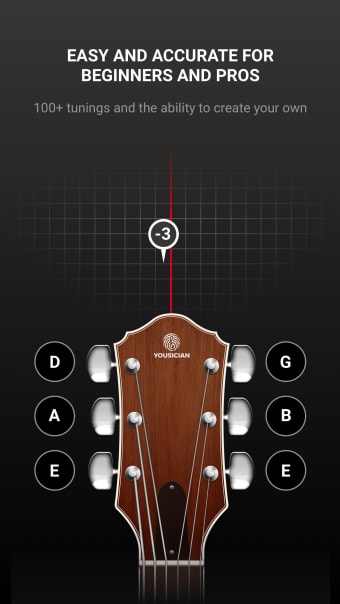
It also bakes in chord libraries and song-practice tools, so it doesn't get deleted after week one the way plenty of tuner-only apps do. In the GuitarTuna vs Fender Tune debate, GuitarTuna usually edges ahead on speed while Fender Tune claws back ground on built-in lessons. Either one is a fine place to start.
2. Fender Guitar Tuner
Fender Tune is the other big free name, available on both Android and iOS, and it doesn't cut corners to get there. The chromatic tracking is clean, and you're looking at twenty-two free tuning options, way more than most beginners will ever actually need. There are short lessons built right in too, so it ends up functioning more like a practice companion than a tuner you open once, use, and never touch again.
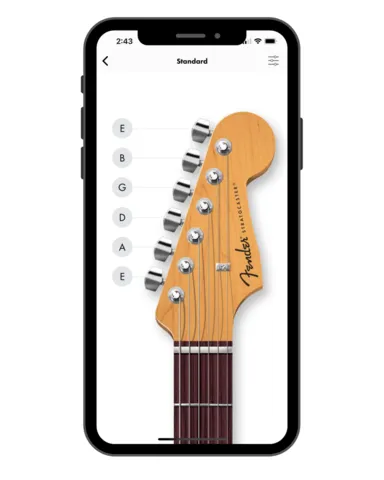
Fender owners tend to reach for this first, since the branding matches the headstock. Makes sense, doesn't it? But the tuning engine works just as well on a Gibson, a secondhand Yamaha, or whatever's leaning in the corner of your bedroom right now.
3. Boss Tuner
The Boss Tuner app trades on decades of pedal reputation, and this Boss Tuner app review keeps landing on the same word every single time: reliable. The display mirrors the classic hardware unit closely, needle sweep included, so anyone who's used a Boss pedal on a board feels instantly at home. It stays readable even in dim stage lighting, and that matters more than you'd think, right up until you're squinting at your phone mid-soundcheck with the house lights already down.
4. Simply Tune
Simply Tune bets everything on one feature, and the bet pays off. The Simply Tune iOS app runs advanced noise-canceling algorithms to isolate your guitar's pitch even in a room stuffed with other instruments. For band rehearsals, where a normal tuner app tends to latch onto the drummer, the bassist, and half the room before it even notices you exist, that's a genuine edge worth having.
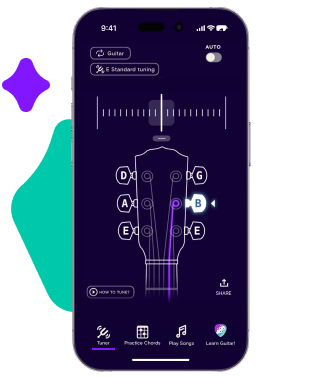
The design stays stripped down on purpose. No lesson library, no song catalog to scroll through, just a fast and accurate tuner doing one job well. Honestly, that's kind of a relief after some of the busier apps out there.
5. Peterson Strobe Tuner
The Peterson Strobe Tuner sits in a category of its own, and it's worth saying that plainly. This Peterson Strobe Tuner review has to lead with the accuracy, because that's really the whole point of the thing: strobe tuners read pitch deviation down to ±0.1 cents, against the one or two cents you'd get from a standard clip-on. Strobe tuner vs clip-on tuner stops being a real contest the moment precision enters the conversation.

Peterson also builds in something called "Sweetened Tunings," tiny per-string offsets that correct for how fretting stretches a string sharp. A regular tuner brings your open strings to mathematically perfect pitch, full stop, end of story. A Peterson on a sweetened setting brings your chords into tune the way your ear actually hears them, fretted notes and all, which is a very different thing. That's exactly why touring professionals keep one in their rig and don't think twice about the cost.
How To Tune A Guitar Accurately
Open the app. Pick your tuning, standard or drop D or something further out on the map. Play one string, watch the display. Sharp means loosen it a touch. Flat means tighten until the needle settles dead center, no guessing.
Work low E to high E, in that order, since tightening one string nudges the others slightly out of place whether you want it to or not. Once you've hit all six, go through them again. Strings drift. A second pass catches whatever the first one missed, pretty much every time.
A stable mobile practice setup makes the whole routine smoother, and this is where a stand earns its keep. Prop your phone on a portable music stand, or something smaller like a capsule music stand, and suddenly you've got real hands-free tuning instead of hunching over your device between every string like you're defusing something.
That same stand doubles as a sheet music holder once you move past tuning into actual playing, so it's worth owning regardless of how often you touch the tuner itself.
For gigs, don't lean on the app alone, ever. Pair it with a clip-on tuner as backup. Room noise confuses a phone's microphone fast, while a clip-on reads vibration straight off the guitar's body and tunes out whatever chaos is happening around it.
RELATED: How to Tune a Guitar Properly (Works For UKE & Bass, Too!)
Conclusion
A good guitar tuner app costs nothing to try, and it saves every practice session from starting off on the wrong foot, which happens more often than most people like to admit. Whether you land on GuitarTuna, Fender Tune, Boss Tuner, Simply Tune, or step up to a Peterson Strobe Tuner, the right pick really just comes down to how and where you play. Casual players do fine with any free option out there. Gigging musicians and studio players tend to notice exactly what that extra precision buys them, usually the first time they don't have it.
Build the habit, grab a proper stand, and the payoff adds up faster than you'd expect. A phone, a small stand, and a tuner app you actually trust turn any room into a workable practice space. Try real hands-free tuning once, just once, and going back to holding your phone in one hand while you fumble with the guitar in the other starts to feel like a step backward you don't really want to take again.